








Wondering how much juice you have left in your external battery pack? Want to check if it needs a recharge or replacement? In this step-by-step guide, as a professional lithium battery packs manufacturer, I will show you the easiest ways to view the battery level percentage on any portable charger or power bank.
How to See Battery Pack Percentage
Check Indicator Lights
The quickest way to gauge remaining battery capacity is to look for indicator lights on your power bank. These are usually LEDs that display different colors or blink patterns to signal the charge level.
Here’s what the indicator lights typically mean:
- Solid Green Light – Battery above 50%
- Solid Orange/Yellow Light – Battery at 20-50%
- Solid Red Light – Battery below 20%
- Blinking Red Light – Battery critically low
So if you see the green indicator glowing, you’re still well-charged. But when that orange or red LED starts blinking, it means you’ll soon need to re-juice your pack.
Use Built-In Digital Display
Higher end battery packs often have small digital displays that show you an exact percentage. This takes the guesswork out of checking battery level since you’ll know if you have 73% or 12% capacity at a glance.
For packs with an LCD screen, simply press the power button or shake the device gently. The screen should light up for a few seconds showing you current battery percentage.
If your external battery pack didn’t come with a display, you can buy clip-on LCD indicators pretty cheaply online. These accessory meters attach to your device and give you that handy percentage readout.
Get Status Via Mobile App
Smart power banks that connect wirelessly via Bluetooth frequently work with companion iOS or Android apps. The app dashboard lets you monitor charging status, battery percentage, temperature, and other metrics all in one place.
For instance, the myCharge Hub app shows battery level on both the power bank and your connected device. The Anker 737 charger has a similar app that keeps tabs on battery percentage and charging speeds.
So if your battery pack works with a mobile app, downloading it on your smartphone is an effortless route to getting charge status.
Measure Voltage Output
While the above options allow quick glances at battery level, this DIY method tells you percentage based on actual voltage.
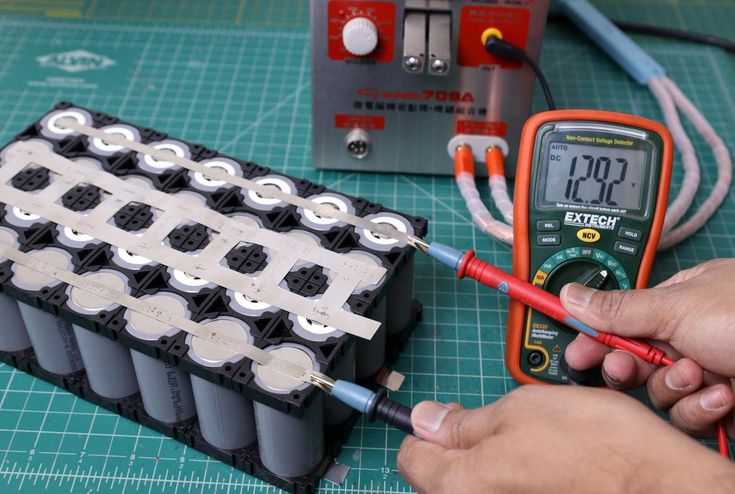
You’ll need a multimeter plus the voltage chart from your battery’s spec sheet. Here’s a simple walkthrough:
Step 1 – Turn on your multimeter, set to DC voltage mode, and adjust to 20v range.
Step 2 – Attach the red multimeter lead to power bank’s positive terminal. Attach black lead to the negative.
Step 3 – Note the voltage reading on your multimeter display.
Step 4 – Check battery spec sheet to see charge level for that voltage output.
This Omnicharge voltage reference chart is a handy example:
- 16.8+ volts = 100% Battery
- 16.4 volts = 80% Battery
- 16.0 volts = 60% Battery
- 15.2 volts = 20% Battery
- 14.4 volts = Battery Dead
So if you measured 16.0 volts, you’d know your pack is around 60% charged based on the specs.
It takes an extra minute, but measuring voltage gives you the best accuracy on true battery percentage.
Battery Maintenance Tips
Now that you know how to monitor level, here are some power bank care tips to keep your battery pack working reliably:
- Recharge Often – Don’t let your pack drain to 0 if possible. Frequent full discharges put strain on batteries.
- Use Periodically – Even occasional brief discharges keep cells active vs. unused packs decaying quicker.
- Store Properly – Save battery at ~40% charge. Store in cool, dry place away from heat/sunlight.
- Inspect Physically – Check for damage, leaks, bloating as these indicate dead battery.
- Replace As Needed – Power banks slowly lose max capacity over years. Swap out older packs every 2-3 years.
Following those simple guidelines will maximize performance and lifespan!
In Conclusion
So in summary, knowing your portable battery percentage is useful for planning charges on the go. And the method you choose depends mostly on your pack’s existing features. Indicator lights are the simplest readout while voltage measurement gives maximum accuracy.
Hopefully you now have all the secrets to easily keep an eye on remaining battery capacity! Check out my other in-depth charging guides for more useful power pack tips.