








Szybkie podsumowanie
Akumulatory litowo-jonowe pęcznieją, gdy dochodzi do wewnętrznego nagromadzenia gazu w wyniku degradacji chemicznej spowodowanej przeładowaniem, ekspozycją na ciepło, starzeniem, uszkodzeniami fizycznymi lub wadami produkcyjnymi. Spuchnięte baterie stwarzają poważne ryzyko pożaru i mogą zniszczyć drogie urządzenia - należy natychmiast zaprzestać korzystania z takich urządzeń.
Zapobieganie obejmuje inteligentne nawyki ładowania (zasada 20/80), zarządzanie temperaturą i wymianę baterii co 2-3 lata. W przypadku wykrycia jakichkolwiek oznak obrzęku, takich jak wybrzuszone obudowy lub podniesione ekrany, należy bezpiecznie pozbyć się baterii w certyfikowanych centrach e-odpadów.
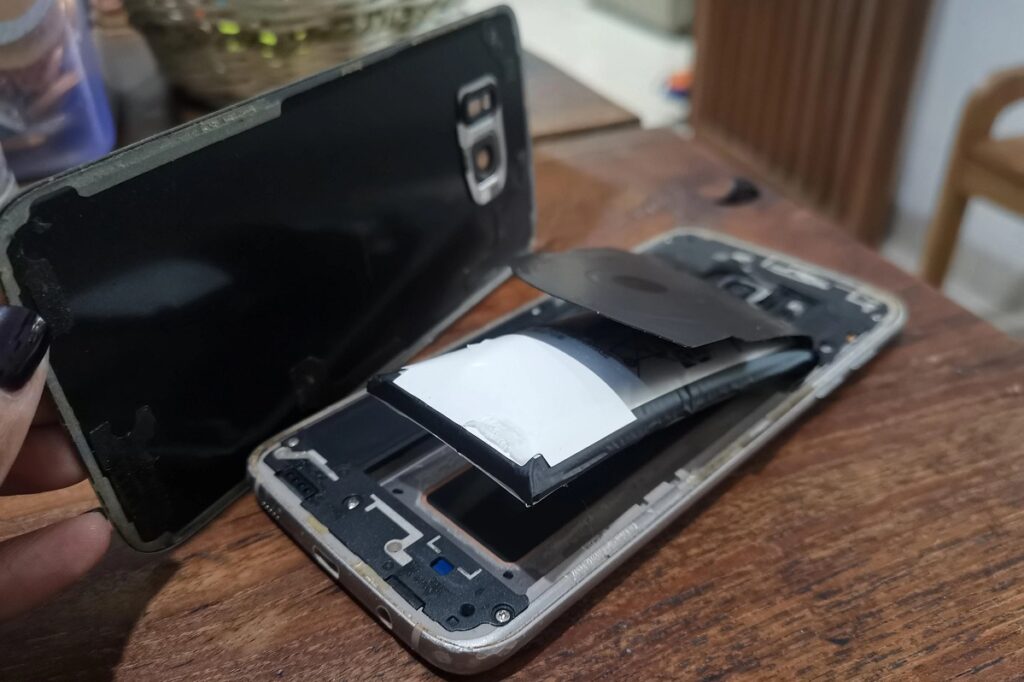
Jeśli kiedykolwiek zauważyłeś, że obudowa twojego telefonu odpadła lub klawiatura laptopa wybrzuszyła się do góry, byłeś świadkiem jednego z najbardziej niepokojących problemów z baterią.
Dlaczego bateria litowo-jonowa puchnie to pytanie, które jest mi często zadawane. I nie bez powodu. Spuchnięta bateria jest nie tylko irytująca - może być wręcz niebezpieczna.
Sprawa wygląda następująco:
Gdy akumulatory litowo-jonowe pęcznieją, dzieje się tak, ponieważ wewnątrz obudowy akumulatora gromadzi się gaz. Dzieje się tak, gdy wewnętrzne elementy akumulatora ulegają uszkodzeniu i uwalniają gazy, takie jak tlen i tlen. dwutlenek węgla.
Pomyśl o tym jak o torebce popcornu z mikrofalówki. W miarę nagrzewania się wnętrza, ciśnienie rośnie, aż opakowanie się rozszerza.
Jednak w przeciwieństwie do popcornu, spuchnięta bateria stanowi poważne zagrożenie dla bezpieczeństwa i wymaga natychmiastowej uwagi. W tym poście, jako profesjonalista Producent akumulatorów litowo-jonowych, podzielę się wszystkim na ten temat.
Co właściwie powoduje obrzęk baterii?
Poniżej przedstawię głównych winowajców rozbudowy baterii:
1. Problemy z przeładowaniem
Pamiętasz pozostawienie telefonu podłączonego na noc? Tak, to nic dobrego.
Przeładowanie akumulatora wywołuje reakcje chemiczne między elektrodami i elektrolitem. Reakcje te:
- Generowanie nadmiernego ciepła
- Produkcja gazu jako produktu ubocznego
- Spowodować wzrost ciśnienia wewnętrznego
Najgorsze? Korzystanie z niewłaściwej ładowarki może 10-krotnie pogorszyć sytuację.
(Przekonałem się o tym na własnej skórze, gdy użyłem taniej ładowarki do tabletu. Bateria spuchła w ciągu 6 miesięcy).
2. Wiek i naturalna degradacja
Oto coś, z czego większość ludzi nie zdaje sobie sprawy:
Wszystkie Baterie litowo-jonowe z czasem ulegają degradacji. To nie jest kwestia czy, ale kiedy.
W miarę starzenia się baterii:
- Wewnętrzne komponenty ulegają awarii
- Reakcje chemiczne stają się mniej wydajne
- Wytwarzanie gazu wzrasta naturalnie
Dane branżowe pokazują, że większość baterii litowych zaczyna wykazywać degradację po 2-3 latach regularnego użytkowania.
3. Ekspozycja na ciepło
Ten jest zabójczy.
Wystawienie akumulatora na działanie temperatury powyżej 60°C (140°F) przyspiesza rozkład chemiczny jak szalony.
Typowe źródła ciepła obejmują:
- Pozostawianie urządzeń w rozgrzanych samochodach
- Bezpośrednia ekspozycja na światło słoneczne
- Intensywne użytkowanie podczas ładowania
- Słaba wentylacja podczas pracy
Jedno z badań wykazało, że baterie wystawione na działanie wysokiej temperatury mogą pęcznieć 3x szybciej niż te przechowywane w temperaturze pokojowej.
4. Uszkodzenia fizyczne
Upuściłeś ostatnio telefon? Uderzenie mogło wyrządzić więcej szkód niż myślisz.
Uraz fizyczny może:
- Uszkodzenie wewnętrznej struktury akumulatora
- Tworzenie mikronakłuć w separatorze
- Prowadzą do wewnętrznych zwarć
Nawet niewielkie uszkodzenie może zapoczątkować reakcję łańcuchową, która prowadzi do obrzęku tygodnie lub miesiące później.
5. Wady produkcyjne
Czasami to wcale nie twoja wina.
Słaba kontrola jakości podczas produkcji może skutkować:
- Zanieczyszczone materiały
- Niewłaściwe uszczelnienie
- Słabości strukturalne
Dlatego tak ważne jest kupowanie baterii od renomowanych producentów.
Nauka stojąca za puchnięciem baterii
Przejdźmy do kwestii technicznych (ale nie za bardzo).
Wewnątrz każdego akumulatora litowo-jonowego znajduje się:
- Elektroda dodatnia (katoda)
- Elektroda ujemna (anoda)
- Roztwór elektrolitu
- Separator
Podczas normalnej pracy jony litu przepływają między tymi elektrodami przez elektrolit.
Ale tutaj sprawy idą źle:
Gdy akumulator doświadcza naprężeń (z dowolnej z powyższych przyczyn), elektrolit zaczyna się rozpadać. W wyniku tego rozpadu powstają gazy.
Ponieważ akumulator jest szczelnie zamknięty, gazy te nie mają dokąd uciec. Ciśnienie rośnie, aż... zgadłeś... bateria puchnie.
Jak rozpoznać spuchniętą baterię
Wczesne wykrycie może uchronić Cię przed wieloma kłopotami.
Znaki wizualne
Szukaj:
- Wybrzuszona lub wypaczona obudowa (najbardziej oczywisty znak)
- Podniesione ekrany na telefonach lub tabletach
- Nieprawidłowości klawiatury na laptopach
- Urządzenie nie siedzi płasko na powierzchniach
Wskazówka: Jeśli obudowa telefonu nagle przestanie pasować, należy natychmiast sprawdzić baterię.
Wskaźniki wydajności
Zanim pojawi się wizualny obrzęk, można go zauważyć:
- Szybkie rozładowanie baterii
- Przegrzanie podczas normalnego użytkowania
- Losowe wyłączenia
- Problemy z ładowaniem
Test zapachu
Ten jest kluczowy:
Jeśli z urządzenia wydobywa się słodki, metaliczny zapach, oznacza to wyciek elektrolitu.
Natychmiast zaprzestać korzystania z urządzenia.
Rzeczywiste przykłady pęcznienia baterii
Pozwolę sobie podzielić się kilkoma rzeczywistymi przypadkami, z którymi się zetknąłem:
Przypadek 1: Laptop biznesowy
Kolega ignorował wybrzuszony gładzik swojego laptopa przez wiele miesięcy. Pewnego dnia bateria powiększyła się tak bardzo, że pękła obudowa laptopa. Całkowita strata: $1,500.
Przypadek 2: Zapomniany tablet
Kiedyś zostawiłem stary tablet w szufladzie na rok. Kiedy go znalazłem, bateria spuchła tak bardzo, że podzieliła urządzenie na pół.
Przypadek 3: Telefon do gier
Telefon do gier znajomego zaczął się przegrzewać podczas intensywnych sesji. W ciągu 3 miesięcy bateria spuchła na tyle, że całkowicie odpadła tylna pokrywa.
Wzorzec? Ignorowanie wczesnych objawów zawsze prowadzi do gorszych (i droższych) problemów.
Niebezpieczeństwa, których nie można ignorować
Oto dlaczego należy poważnie traktować obrzęk baterii:
Ryzyko pożaru
Spuchnięte baterie są zasadniczo bombami ciśnieniowymi. Jeśli zostaną przebite lub ściśnięte:
- Łatwopalny elektrolit może wyciec
- Reakcje chemiczne mogą powodować niekontrolowany wzrost temperatury
- Pożary mogą wybuchnąć w ciągu kilku sekund
Statystyki pokazują, że liczba pożarów związanych z bateriami wzrosła o 40% od 2020 roku.
Narażenie na toksyczne substancje chemiczne
Uszkodzona bateria uwalnia się:
- Szkodliwe gazy
- Elektrolit powodujący korozję
- Cząsteczki metali ciężkich
Narażenie może powodować oparzenia skóry, problemy z oddychaniem i uszkodzenie oczu.
Niszczenie urządzeń
Poza kwestiami bezpieczeństwa, spuchnięte baterie niszczą kosztowną elektronikę:
- Pęknięte ekrany ($300+ do wymiany)
- Wypaczone podwozie (często nienaprawialne)
- Uszkodzone elementy wewnętrzne
Jak bezpiecznie obchodzić się ze spuchniętą baterią?
Znalazłeś spuchniętą baterię? Oto plan działania:
Krok 1: Zaprzestanie korzystania z urządzenia
Nie mogę tego wystarczająco podkreślić:
Nie kontynuować korzystania z urządzenia ze spuchniętą baterią. Nawet “tylko przez kilka dni”.”
Krok 2: Bezpieczne wyłączenie zasilania
Jeśli to możliwe:
- Zapisywanie pracy
- Tworzenie kopii zapasowych krytycznych danych
- Całkowite wyłączenie urządzenia
- Odłącz wszystkie kable
Krok 3: Wyjmij baterię (jeśli jest wyjmowana)
Dla baterii wymiennych:
- Praca w dobrze wentylowanym miejscu
- Nosić rękawice ochronne
- Używaj plastikowych narzędzi (nigdy metalowych)
- Umieść akumulator w ognioodpornym pojemniku
Krok 4: Zabezpieczenie niewymiennych baterii
Dla wbudowanych akumulatorów:
- Nie próbuj usuwać samodzielnie
- Umieść całe urządzenie w bezpiecznym miejscu
- Przechowywać z dala od materiałów łatwopalnych
- Natychmiast skontaktuj się ze specjalistą
Krok 5: Prawidłowa utylizacja
Nigdy nie wyrzucaj spuchniętych baterii do zwykłych śmieci.
Zamiast tego:
- Zanieś do certyfikowanych centrów e-odpadów
- Korzystaj z programów recyklingu baterii
- Skontaktuj się z producentem, aby uzyskać informacje na temat opcji utylizacji
Strategie prewencyjne, które faktycznie działają
Chcesz całkowicie uniknąć obrzęku baterii? Postępuj zgodnie z tymi sprawdzonymi strategiami:
Inteligentne nawyki ładowania
Zasada 20/80 jest złota:
- Utrzymywanie poziomu naładowania baterii pomiędzy 20% a 80%
- Unikaj ładowania w nocy
- Należy używać wyłącznie ładowarek zatwierdzonych przez producenta
Stosuję tę metodę od 3 lat, a stan baterii mojego telefonu nadal wynosi 94%.
Zarządzanie temperaturą
Chroń swoje urządzenia:
- Unikać bezpośredniego światła słonecznego
- Zdejmowanie obudowy podczas ładowania
- Podkładki chłodzące do laptopów
- Nigdy nie zostawiaj urządzeń w gorących samochodach
Regularna konserwacja
Comiesięczne kontrole mogą wcześnie wykryć problemy:
- Sprawdzić pod kątem uszkodzeń fizycznych
- Monitorowanie stanu baterii w ustawieniach
- Czyste porty ładowania
- Aktualizacja oprogramowania sprzętowego urządzenia
Jakość ponad cenę
Tanie baterie zamienne to fałszywa oszczędność.
Trzymaj się:
- Akumulatory OEM (Original Equipment Manufacturer)
- Certyfikowane opcje innych firm
- Baterie z odpowiednimi certyfikatami bezpieczeństwa
Ulepszenia technologii akumulatorów
Dobra wiadomość? Technologia baterii staje się coraz lepsza.
Baterie półprzewodnikowe
Są to akumulatory nowej generacji:
- Eliminacja ciekłego elektrolitu
- Znaczne zmniejszenie ryzyka obrzęku
- Oferują lepszą gęstość energii
Główni producenci planują komercyjną premierę do 2028 roku.
Lepsze systemy zarządzania akumulatorami
Nowoczesne urządzenia obejmują:
- Zaawansowany monitoring termiczny
- Inteligentne algorytmy ładowania
- Optymalizacja napięcia
- Predykcyjne wykrywanie awarii
Alternatywne chemikalia
Baterie litowo-żelazowo-fosforanowe (LFP):
- Bardziej stabilny niż tradycyjny litowo-jonowy
- Niższe ryzyko obrzęku
- Dłuższa żywotność
- Już używane w niektórych urządzeniach
Kiedy należy wymienić baterię
Nie czekaj na widoczny obrzęk. Wymień baterię, jeśli:
- Kondycja baterii spada poniżej 80%
- Ładowanie trwa znacznie dłużej
- Urządzenie wyłącza się przy 10-20% baterii
- Zauważyłeś JAKIEKOLWIEK fizyczne odkształcenie
Większość producentów zaleca wymianę baterii co 2-3 lata w celu zapewnienia optymalnej wydajności.
Najważniejsze informacje na temat puchnięcia baterii
Opuchlizna baterii to nie tylko niedogodność - to poważny problem bezpieczeństwa, który wymaga natychmiastowego działania.
Najważniejsze wnioski:
- Wiele czynników powodować obrzęk (ciepło, wiek, uszkodzenie, przeładowanie)
- Wczesne wykrywanie zapobiega katastrofalnej awarii
- Właściwa obsługa ma kluczowe znaczenie dla bezpieczeństwa
- Zapobieganie jest zawsze lepsze niż radzenie sobie ze spuchniętymi bateriami
Pamiętaj: Żadne urządzenie nie jest warte narażania swojego bezpieczeństwa. W razie wątpliwości wymień baterię.
Postępując zgodnie z przedstawionymi przeze mnie strategiami zapobiegawczymi, można znacznie wydłużyć żywotność baterii i całkowicie uniknąć niebezpieczeństw związanych z opuchlizną.
Bądź bezpieczny i utrzymuj baterie w dobrym stanie.
Pytanie “Dlaczego bateria litowo-jonowa puchnie” ma jasną odpowiedź: wewnętrzne nagromadzenie gazu w wyniku degradacji chemicznej. Ale teraz wiesz dokładnie, co jest przyczyną tego zjawiska, jak je wykryć, a co najważniejsze - jak zapobiec jego wystąpieniu w Twoich urządzeniach.