








Resumen rápido
Las baterías de iones de litio se hinchan cuando se produce una acumulación interna de gas debido a la degradación química causada por la sobrecarga, la exposición al calor, el envejecimiento, los daños físicos o los defectos de fabricación. Las baterías hinchadas suponen un grave riesgo de incendio y pueden destruir dispositivos caros: deje de utilizar inmediatamente los dispositivos afectados.
La prevención implica hábitos de carga inteligentes (regla 20/80), gestión de la temperatura y sustitución de las baterías cada 2-3 años. Si detecta algún signo de hinchazón, como carcasas abultadas o pantallas levantadas, deseche la batería de forma segura en centros de residuos electrónicos certificados.
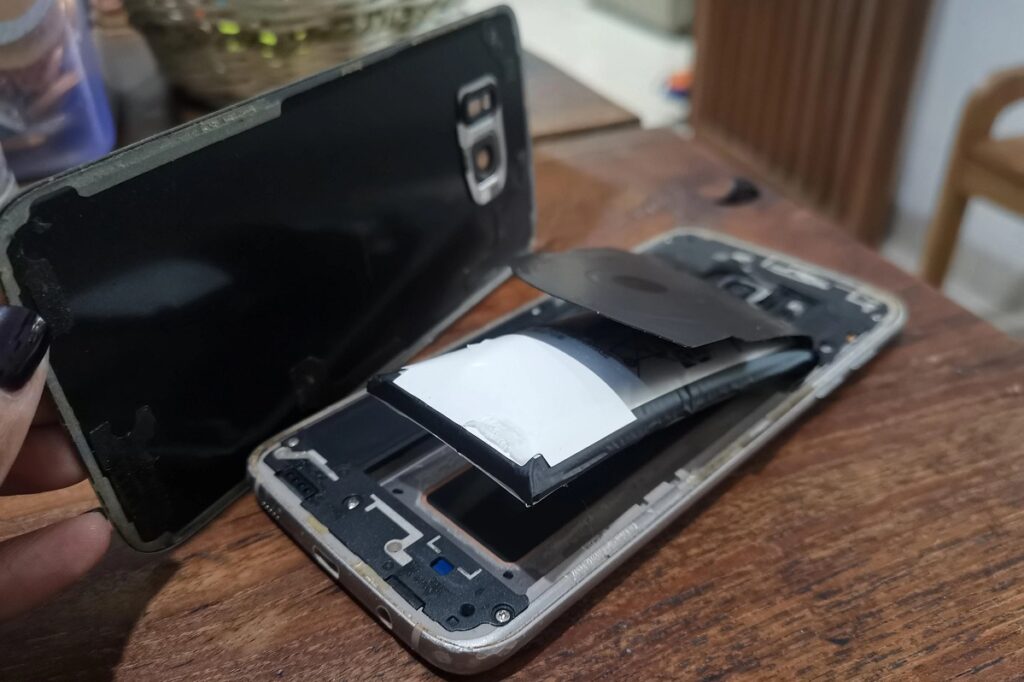
Si alguna vez has notado que la carcasa de tu teléfono salta por los aires o que el teclado de tu portátil se abomba hacia arriba, has sido testigo de uno de los problemas de batería más alarmantes que existen.
Por qué se hinchan las baterías de iones de litio es una pregunta que me hacen a menudo. Y con razón. Una batería hinchada no sólo es molesta, sino que puede ser francamente peligrosa.
Este es el trato:
Cuando las baterías de iones de litio se hinchan, es porque se está acumulando gas dentro de la carcasa de la batería. Esto ocurre cuando los componentes internos de la batería se descomponen y liberan gases como oxígeno y dióxido de carbono.
Piense en ello como si fuera una bolsa de palomitas para microondas. A medida que las cosas se calientan en el interior, la presión aumenta hasta que el paquete se expande.
Pero a diferencia de las palomitas de maíz, una batería hinchada es un grave peligro para la seguridad que requiere atención inmediata. En este post, como profesional fabricante de baterías de ión litio, ...compartiré todo al respecto.
¿Qué causa realmente la hinchazón de la batería?
Permítanme desglosar los principales culpables de la expansión de la batería:
1. Problemas de sobrecarga
¿Recuerdas dejar el móvil enchufado toda la noche? Sí, eso no está bien.
Cuando se sobrecarga una batería, se desencadenan reacciones químicas entre los electrodos y el electrolito. Estas reacciones:
- Generar calor excesivo
- Producir gas como subproducto
- Crear una acumulación de presión interna
¿Y lo peor? Usar el cargador equivocado puede empeorar la situación 10 veces.
(Lo aprendí por las malas cuando utilicé un cargador de imitación barato para mi tableta. La batería se hinchó en 6 meses).
2. Edad y degradación natural
Hay algo de lo que la mayoría de la gente no se da cuenta:
Todos Las baterías de iones de litio se degradan con el tiempo. No es cuestión de si ocurrirá, sino de cuándo.
A medida que las baterías envejecen:
- Los componentes internos se descomponen
- Las reacciones químicas pierden eficacia
- La generación de gas aumenta de forma natural
Los datos del sector muestran que la mayoría de las baterías de litio empiezan a degradarse tras 2-3 años de uso regular.
3. Exposición al calor
Este es un asesino.
Exponer la batería a temperaturas superiores a 60 °C (140 °F) acelera enormemente su descomposición química.
Las fuentes de calor más comunes son:
- Dejar aparatos en coches calientes
- Exposición directa al sol
- Uso intensivo durante la carga
- Mala ventilación durante el funcionamiento
Un estudio descubrió que las pilas expuestas a altas temperaturas pueden hincharse 3 veces más rápido que las que se mantienen a temperatura ambiente.
4. 4. Daños físicos
¿Se te ha caído el móvil recientemente? Ese impacto puede haberte hecho más daño del que crees.
El trauma físico puede:
- Dañar la estructura interna de la batería
- Crear microdesgarros en el separador
- Provocan cortocircuitos internos
Incluso un daño menor puede iniciar una reacción en cadena que provoque hinchazón semanas o meses después.
5. Defectos de fabricación
A veces no es culpa tuya en absoluto.
Un control de calidad deficiente durante la fabricación puede dar lugar a:
- Materiales contaminados
- Sellado incorrecto
- Debilidades estructurales
Por eso es tan importante comprar pilas de fabricantes reputados.
La ciencia detrás de la hinchazón de las pilas
Pongámonos un poco técnicos (pero no demasiado).
Dentro de cada batería de iones de litio, tienes:
- Un electrodo positivo (cátodo)
- Un electrodo negativo (ánodo)
- Una solución electrolítica
- Un separador
Durante el funcionamiento normal, los iones de litio fluyen entre estos electrodos a través del electrolito.
Pero aquí es donde las cosas van mal:
Cuando la pila sufre tensiones (por cualquiera de las causas anteriores), el electrolito empieza a descomponerse. Esta descomposición produce gases.
Como la batería está sellada, estos gases no tienen adónde ir. La presión aumenta hasta que... lo has adivinado... la batería se hincha.
Cómo detectar una batería hinchada
La detección precoz puede evitarle muchos problemas.
Señales visuales
Busca:
- Carcasa abombada o deformada (signo más evidente)
- Pantallas elevadas en teléfonos o tabletas
- Irregularidades del teclado en portátiles
- El dispositivo no queda plano en superficies
Consejo profesional: Si de repente la funda de tu teléfono no encaja bien, comprueba la batería inmediatamente.
Indicadores de resultados
Antes de que se produzca la hinchazón visual, es posible que lo notes:
- Agotamiento rápido de la batería
- Sobrecalentamiento durante el uso normal
- Paradas aleatorias
- Problemas de carga
La prueba del olor
Esto es crucial:
Si percibes un olor dulce y metálico procedente de tu dispositivo, eso es una fuga de electrolito.
Deje de utilizar el aparato inmediatamente.
Ejemplos reales de hinchazón de baterías
Permítanme compartir algunos casos reales con los que me he encontrado:
Caso 1: el portátil profesional
Un colega ignoró durante meses el abultado trackpad de su portátil. Un día, la batería se expandió tanto que rompió el chasis del portátil. Pérdida total: $1.500.
Caso 2: La tableta olvidada
Una vez dejé una vieja tableta en un cajón durante un año. Cuando la encontré, la batería se había hinchado tanto que partió el dispositivo por la mitad.
Caso 3: El teléfono para juegos
El teléfono para juegos de un amigo empezó a sobrecalentarse durante sesiones intensas. Al cabo de 3 meses, la batería se hinchó lo suficiente como para hacer saltar la tapa trasera por completo.
¿Cuál es el patrón? Ignorar las señales tempranas siempre conduce a problemas peores (y más caros).
Los peligros que no puede ignorar
A continuación te explicamos por qué deberías tomarte en serio la hinchazón de la batería:
Riesgo de incendio
Las pilas hinchadas son esencialmente bombas de presión. Si se pinchan o aprietan:
- Puede salir electrolito inflamable
- Las reacciones químicas pueden provocar un desbordamiento térmico
- Los incendios pueden iniciarse en cuestión de segundos
Las estadísticas muestran que los incendios relacionados con las baterías han aumentado en 40% desde 2020.
Exposición a sustancias químicas tóxicas
Una batería comprometida libera:
- Gases nocivos
- Electrolito corrosivo
- Partículas de metales pesados
La exposición puede causar quemaduras en la piel, problemas respiratorios y daños oculares.
Destrucción de dispositivos
Más allá de los problemas de seguridad, las baterías hinchadas destruyen aparatos electrónicos caros:
- Pantallas agrietadas ($300+ para sustituir)
- Chasis deformado (a menudo irreparable)
- Componentes internos dañados
Cómo manipular con seguridad una batería hinchada
¿Has encontrado una pila hinchada? Este es tu plan de acción:
Paso 1: Deje de utilizar el dispositivo
No me canso de repetirlo:
No lo haga seguir utilizando un aparato con la batería hinchada. Ni siquiera “sólo unos días más”.”
Paso 2: Apagar de forma segura
Si es posible:
- Guarda tu trabajo
- Copia de seguridad de datos críticos
- Apagar completamente el dispositivo
- Desenchufe todos los cables
Paso 3: Retire la batería (si es extraíble)
Para pilas extraíbles:
- Trabaje en una zona bien ventilada
- Llevar guantes de protección
- Utiliza herramientas de plástico (nunca metálicas)
- Coloque la batería en un recipiente ignífugo
Paso 4: Asegurar las pilas no extraíbles
Para pilas incorporadas:
- No intente retirarlo usted mismo
- Coloca todo el dispositivo en un lugar seguro
- Mantener alejado de materiales inflamables
- Póngase en contacto con un profesional inmediatamente
Paso 5: Eliminación adecuada
Nunca tire las pilas hinchadas a la basura normal.
En su lugar:
- Llevar a centros de residuos electrónicos certificados
- Utilizar programas de reciclaje de pilas
- Póngase en contacto con el fabricante para conocer las opciones de eliminación
Estrategias de prevención que realmente funcionan
¿Quiere evitar por completo la hinchazón de la batería? Sigue estas estrategias de eficacia probada:
Hábitos de carga inteligentes
La regla 20/80 es de oro:
- Mantén los niveles de batería entre 20% y 80%
- Evitar la carga nocturna
- Utiliza sólo cargadores aprobados por el fabricante
He estado siguiendo esto durante 3 años, y la salud de la batería de mi teléfono está todavía en 94%.
Gestión de la temperatura
Mantén fríos tus dispositivos:
- Evitar la luz solar directa
- Quitar las fundas durante la carga
- Utilice almohadillas refrigerantes para portátiles
- No deje nunca los dispositivos en coches calientes
Mantenimiento periódico
Las revisiones mensuales pueden detectar los problemas a tiempo:
- Inspección de daños físicos
- Controla el estado de la batería en los ajustes
- Puertos de carga limpios
- Actualizar el firmware del dispositivo
Calidad por encima del precio
Las pilas de recambio baratas son un falso ahorro.
Pégate:
- Baterías OEM (fabricantes de equipos originales)
- Opciones de terceros certificados
- Baterías con las certificaciones de seguridad adecuadas
Mejoras en la tecnología de las baterías
¿La buena noticia? La tecnología de las baterías sigue mejorando.
Baterías de estado sólido
Estas baterías de nueva generación:
- Eliminar el electrolito líquido
- Reducir drásticamente el riesgo de hinchazón
- Ofrecen mayor densidad energética
Los principales fabricantes prevén su lanzamiento comercial para 2028.
Mejores sistemas de gestión de baterías
Los dispositivos modernos incluyen:
- Control térmico avanzado
- Algoritmos de carga inteligentes
- Optimización de la tensión
- Detección predictiva de fallos
Químicas alternativas
Baterías de fosfato de litio y hierro (LFP):
- Más estable que el ión-litio tradicional
- Menor riesgo de hinchazón
- Mayor vida útil
- Ya se utiliza en algunos dispositivos
Cuándo cambiar la batería
No espere a que se produzca una hinchazón visible. Sustituya la batería si:
- La salud de la batería cae por debajo de 80%
- La carga tarda mucho más
- El dispositivo se apaga con una batería de 10-20%
- Observa CUALQUIER deformación física
La mayoría de los fabricantes recomiendan cambiar las pilas cada 2-3 años para obtener un rendimiento óptimo.
Lo esencial sobre la hinchazón de las pilas
La hinchazón de la batería no es sólo un inconveniente: es un grave problema de seguridad que exige una actuación inmediata.
Las principales conclusiones:
- Múltiples factores causar hinchazón (calor, edad, daños, sobrecarga)
- Detección precoz evita fallos catastróficos
- Manipulación adecuada es crucial para la seguridad
- Prevención siempre es mejor que lidiar con baterías hinchadas
Recuerda: No vale la pena arriesgar la seguridad de ningún dispositivo. En caso de duda, sustituye la batería.
Siguiendo las estrategias de prevención que he descrito, puedes prolongar considerablemente la duración de la batería y evitar por completo los peligros de la hinchazón.
Cuídate y mantén las pilas bien puestas.
La pregunta “por qué se hinchan las baterías de iones de litio”tiene una respuesta clara: la acumulación interna de gas por degradación química. Pero ahora ya sabes exactamente qué lo provoca, cómo detectarlo y, lo más importante, cómo evitar que le ocurra a tus dispositivos.